
Overview
This article explains how members can choose their own membership start date and first full recurring billing date during sign-up. This flexibility helps billing align with a member’s pay schedule, increases payment success, and creates a clearer, more predictable experience for everyone.
With this feature, members can:
-
Start their membership on a day that suits them
-
Choose when their first full billing cycle begins
-
See an accurate pro-rated charge automatically calculated at checkout
This feature is especially helpful in weekly, fortnightly, 28-day, and monthly billing markets where paydays vary.
Important: Please contact your Customer Success Manager to express interest in this feature.
How to Configure Custom Start & Billing Dates
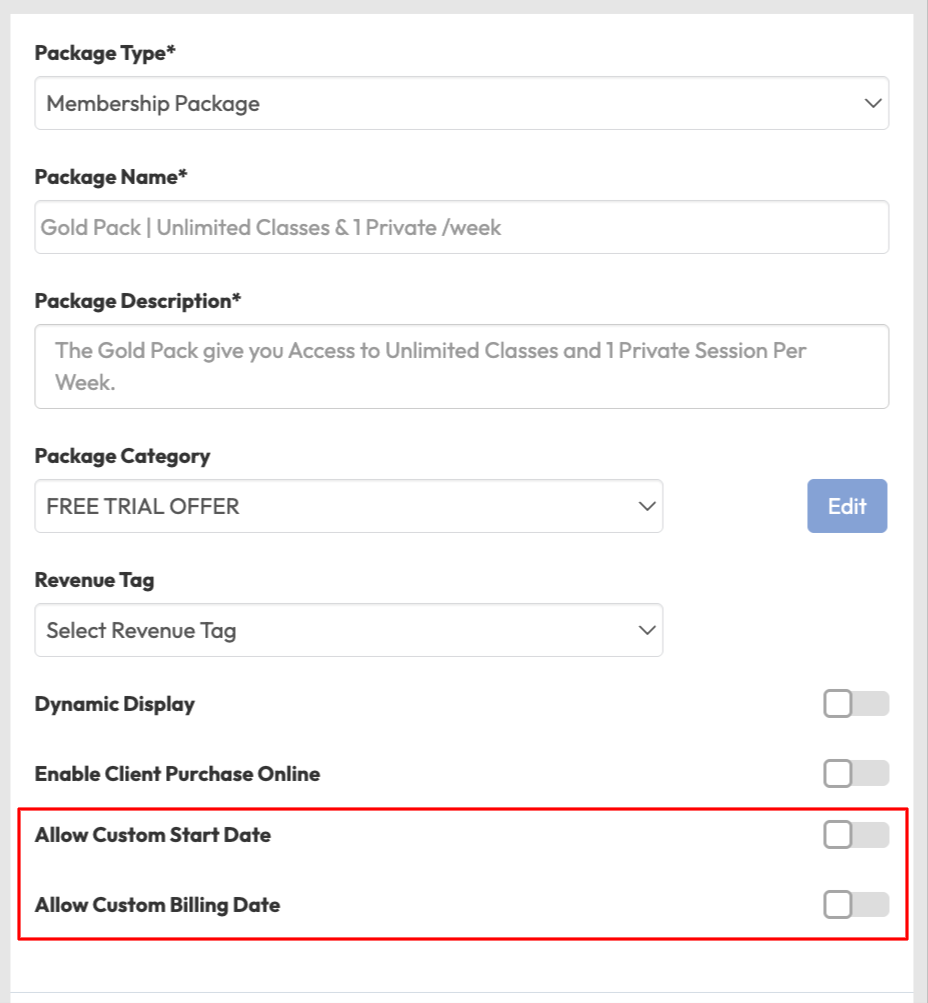
You can control whether members are able to select a custom membership start date and/or a custom first billing date when purchasing memberships. These options are configured at the membership level when creating or editing a membership within Payments > Retail Configurations > Memberships > Edit existing or Create New.
Two configuration toggles are available:
-
Allow Custom Start Date: Allows members to choose a future membership start date when purchasing through the app or website.
-
Allow Custom Billing Date: Allows members to choose their first full recurring billing date. This option requires Allow Custom Start Date to be enabled.
Both settings are OFF by default.
Toggle Dependency Rules
-
Enabling Allow Custom Billing Date will automatically enable Allow Custom Start Date.
-
Disabling Allow Custom Start Date will automatically disable Allow Custom Billing Date.
This allows businesses to choose the billing model that best suits their business, including immediate billing, anniversary billing, or flexible billing with proration.
Member Sign-Up Experience
When Members purchase unlimited credit memberships, they may see options to select a start date and billing date in the mobile app and website embed depending on the package configuration set by the business.
1. Select a Membership
-
Member opens app
-
Navigates to More > Buy new packages
-
Member chooses an unlimited credit membership
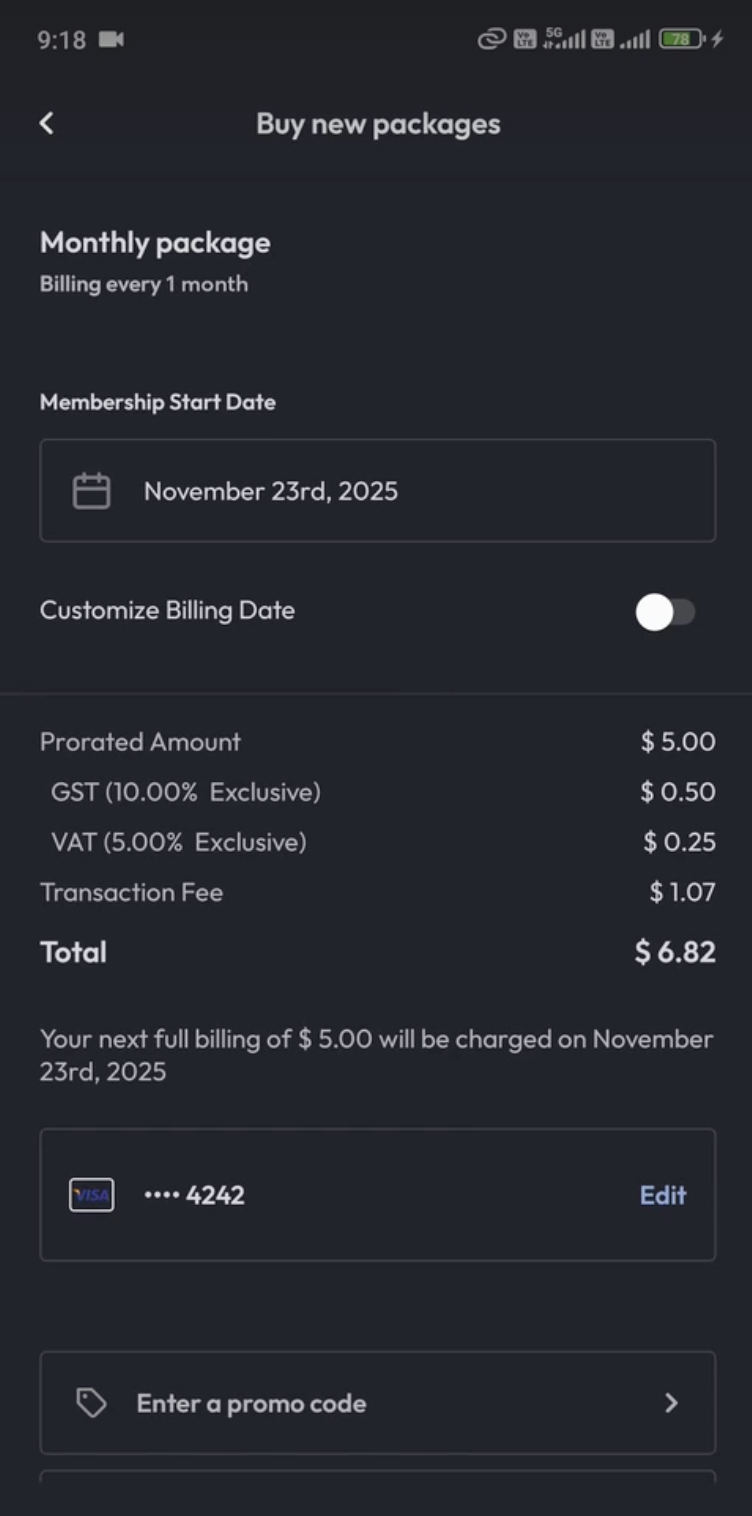
2. Pick a Start Date
This option only appears if Allow Custom Start Date is enabled on the membership package.
-
Choose a Membership Start Date using the calendar dropdown.
-
Default: Today
3. Choose a Billing Day
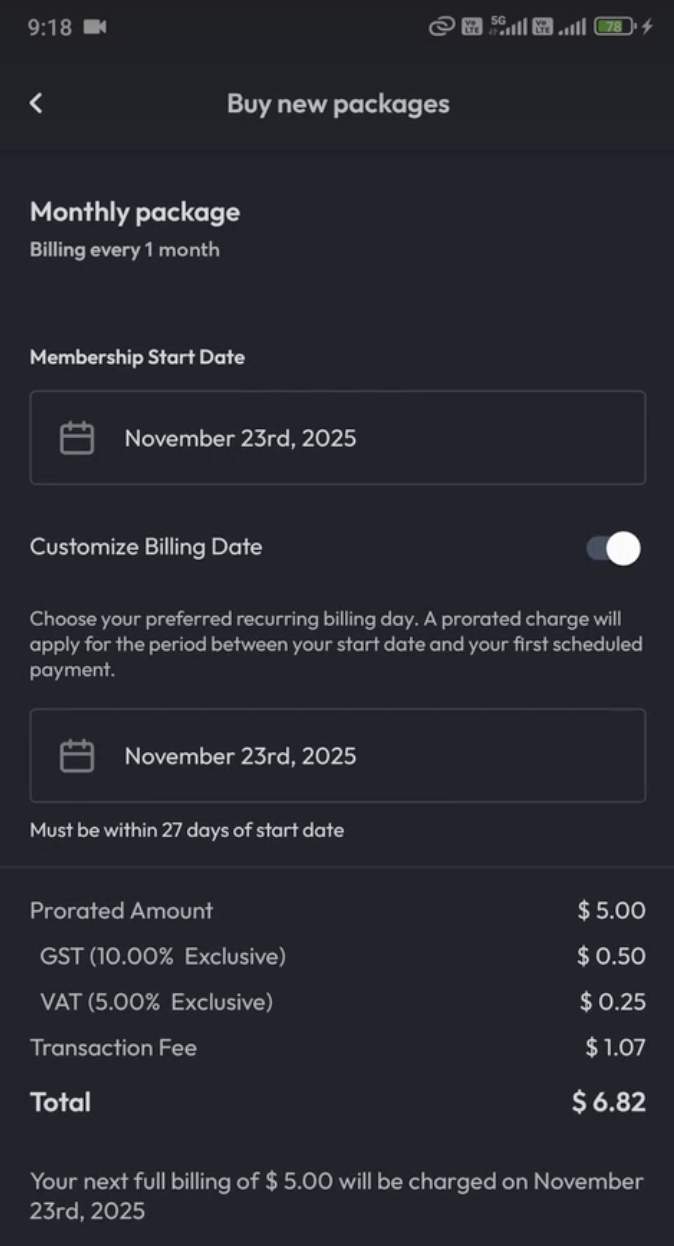
This option only appears if Allow Custom Billing Date is enabled on the membership package.
The first full recurring billing date is controlled by the Customize Billing Date toggle:
Default (Toggle OFF)
-
The First Full Billing Date matches the Start Date automatically.
-
The member is billed fully on the same day their access begins.
Flexible Billing (Toggle ON)
-
Switch the Customize Billing Date toggle to ON
-
Members can choose a preferred recurring billing day using the calendar picker.
-
Members can select from available options, depending on the membership billing cycle:
- Weekly - Available days: Next 6 days after start date.
- Fortnightly - Available days: Next 13 days after start date.
- 28-Day (4-Weekly) - Available days: Next 27 days after start date.
- Monthly - Options include:
-
Fixed date (1st–28th)
-
Members may select up to one month after the start date.
-
The selected date becomes their permanent monthly billing day.
-
4. Review the Pro-Rated Amount
Hapana automatically calculates the prorated charge that will apply for the period between the member's start date and their first scheduled payment.
Members will see a clear breakdown that includes:
-
What they pay today: Prorated amount & Total
-
Date and amount of next charge: Full recurring amount & First billing date
5. Complete the Sale
-
Review the summary & checkout
-
Hapana schedules the first full recurring charge based on the date selected or defaulted.
Expected Outcome
-
Members can choose both their start date and first full billing date to align billing with their pay schedule.
-
Billing defaults are simple and predictable, while flexibility is available when needed.
-
Members enjoy billing that matches their pay schedule, improving satisfaction and payment success.
FAQ
Q: What happens if a member picks the same day as their start date?
A: No pro-rata charge applies, the first billing will begin on that day.
Q: Why does the billing date match the start date by default?
A: For simplicity. When the toggle is off, Hapana treats the membership start date and first billing date as the same. Turning the toggle ON unlocks full flexibility.
Need more help? Reach out to our support team via support@hapana.com.